
Free video conversion software
MKV to MP4 Converter is a video conversion program that changes a Matroska Video (.MKV) file to the more commonly used MPEG-4 (.MP4) format. This is particularly useful if you plan to transfer video files to devices that do not support MKV video files.
Top Recommended Alternative

It comes in a free trial version that only limits the conversion to half of the input video. To convert full files, you need to purchase the full version and input the registration code. This puts MKV to MP4 Converter at a huge disadvantage over other video converters like the Total Video Converter.
A compact video converter
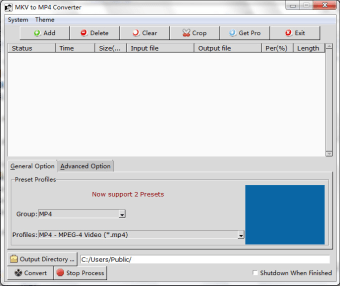
The installer for MKV to MP4 Converter is only 17MB, with an installation procedure that takes a little over a minute. Once you’ve set up the program, you can see its simple interface that allows you to do a variety of things to your video file. Aside from simply adding or deleting video files for conversion, you may also Crop the file, adjusting the screen size to fit your device better or remove content you don’t need.
Giving its users a wide range of options about their conversion process. With this app, you can modify the parameters that affect the quality of the video like size, framerate, and even the video codec to use. There are also options for adjusting the sound quality. For non-technical users, they can just as easily leave everything as is with the “Auto” option and let the converter do its job.
Also, the video converter app has preset options that make conversion simpler for users. You can choose the output device and expect the converter to optimize the converted video in terms of resolution and screen size. There are also different MP4 Profiles such as widescreen, a faster compression time, and a “no re-encode” where the files are only converted as is, without compression or any changes in the file quality.
Great for multitaskers
The MKV to MP4 Converter is a great companion for people who like to convert large batches of videos at a time, like an entire season of their favorite shows. By simply clicking the Add button and dragging all files you want to convert, you can save time instead of adding files one by one. Similarly, you can change the parameters and settings for all queued files by using the app’s interface.
After you line up multiple files for conversion and after that, the converter automatically shuts down. However, when you restart the program, the progress is saved and you can easily retrieve the files you’ve converted. This feature, however, can be toggled on or off by clicking the “Shutdown When Finished” checkbox at the lower right of the screen, allowing you to save on your system’s resources by letting the app turn itself off after its tasks.
Good at what it does
MKV to MP4 Converter is an easy-to-use tool that works for both technical and non-technical users with its versatile options. You can either change each of the parameters or just leave them as they are, and watch the converter work. Additionally, it allows you to convert multiple files and leave them. You can even set the app to shut down by itself after it’s done with its tasks.